A limited edition sells on scarcity and timing. Shopify can hold the stock, but it can't count down to a release, lock Add to cart until it opens, or tell shoppers how many of fifty are left. A drop app does.
Limited edition or drop? Both, usually
Two ideas get mixed together, and it helps to keep them apart.
- A limited edition is a product with a fixed run: an edition of 50 prints, or a 1 of 1. The edition size is a fact about the product and stays with it after launch.
- A drop is a release event: one or more products that go on sale at a set time, often with a countdown and a sign-up list beforehand.
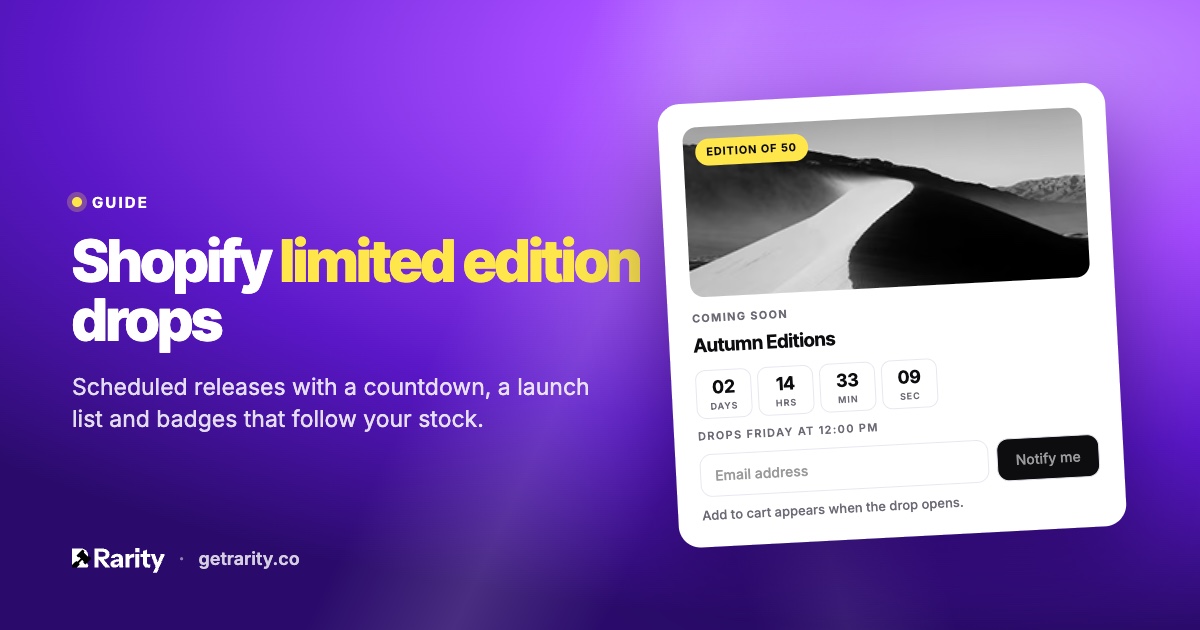
Most releases use both. A print shop announces a drop of three new editions for Friday at noon. Before noon, shoppers see a countdown and can join the list. At noon, Add to cart appears. Afterwards, each print carries its edition badge and a live count of how many are left.
How to run a drop on Shopify with Rarity
- Plan the drop. Pick the products, set the opening time and, if you want, a closing time. You can announce it ahead of time or keep it quiet until it opens.
- Add the blocks. The Countdown widget goes on your product template, the Drop promo widget on your home page. Both are theme app blocks, added once in the theme editor.
- Before it opens. Product pages show a countdown instead of Add to cart, and nobody can buy early, including through a direct cart link. A Notify me form collects emails into the drop's launch list.
- When it opens. Add to cart appears, the product page shows a Live now strip with a link to the full drop, and the launch list gets an email.
- When it closes. The drop closes at its end time or when the editions sell out. Anything unsold can be moved to an auction or opened to offers in one click.
Rarity also adds a floating Drops button on every page that lists live and upcoming drops, and a drop page for each release that you can link from social posts. Every drop comes with a ready-to-paste caption for Instagram and your newsletter, in your store's time zone.
Edition badges that follow your stock
Tag a product as a limited edition and give it a size. Rarity writes the edition to the product, and badges appear on the product's photos and on collection cards: "Edition of 50", "1 of 1", and "12 of 50 left". The remaining count comes from your real Shopify inventory, not a separate counter, so it's right even when you sell in person or through another channel.
When the last one sells, the badge switches to Sold out. Badges come in pill, corner and ribbon styles, and you choose their position and colours in the app. Each badge embed has its own switches for the home page, the catalog and collection pages.
The launch list and drop emails
The Notify me form under the countdown builds a list for each drop. On Starter and Pro, Rarity emails that list when the drop is announced, when it's about to open, when it's live and, if you choose, when it closes. You write the headings; the emails carry the product images and a link to the drop. If you use Klaviyo, subscribers can go to your Klaviyo list instead, or be tagged as Shopify customers for your own flows.
The form tells subscribers what they're signing up for, and every email carries an unsubscribe link, so the list stays clean and compliant.
After the drop
Each drop keeps its own numbers: units sold, revenue and how many people joined the list. Over time that tells you which release days and which edition sizes work for your collectors. Unsold pieces don't have to sit there: a closed drop can hand them to an auction or to offers, so the release keeps working after the countdown is over.
What it costs
The Free plan includes 1 drop a month with edition badges and countdowns. Starter at $5 a month runs 3 drops a month and adds the launch list emails and Klaviyo. Pro at $20 a month has unlimited drops. Your first paid plan starts with a 7-day free trial. See the pricing section for the full comparison.
Questions
Can shoppers buy before a drop opens?
No. Add to cart is hidden on the product page until the opening time, and direct cart links for those products are blocked while the drop is coming soon.
Does a drop need an auction?
No. A drop can be a plain timed release at a fixed price. Auctions and offers are there if you want them, including for pieces left over after a drop closes.
Where does the remaining count come from?
From your Shopify inventory. The badge shows how many units are left across the product's tracked variants, so selling through another channel updates it too.
What if a drop sells out early?
The drop closes when the editions sell out, the badges switch to Sold out, and the closing email goes to the launch list if you've turned it on.
Still unsure? Ask us; we answer within one business day.
 Install on Shopify